


Monitoring Wedge Tibbo IO Ninja Serial Tap RS232, RS485, TTL-level UART
280,00$
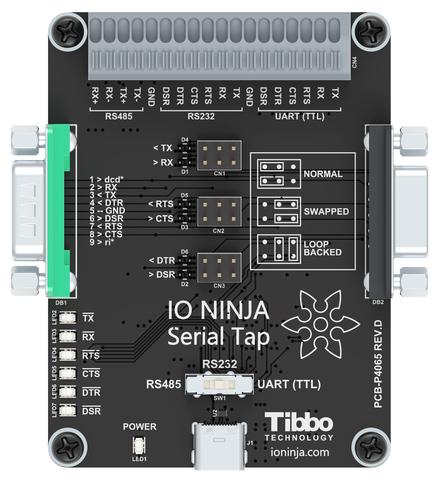
The Serial Tap is an affordable sniffer for monitoring RS232, RS485 and TTL-level UART communications. The sniffer taps into the data and control lines of serial links and sends the recorded data to IO Ninja software in real time.
The Serial Tap is an affordable sniffer for monitoring RS232, RS485, and TTL-level UARTcommunications. The sniffer taps into the data and control lines of serial links and sends the recorded data to IO Ninja software in real time.
All inputs of the serial tap are available on a quick-release terminal block. The Tap also features two DB9 connectors for „wedge“ monitoring of RS232 communications. The board even provides jumpers for swapping and loopbacking RS232 signals, as well as bi-color LEDs for RS232 line status indication. The jumpers and bi-color LEDs give the Tap an additional use as a simple tool for debugging RS232 wiring issues.
This sniffer device must be used with the Serial Tap plugin.
Wedge RS232 Monitoring
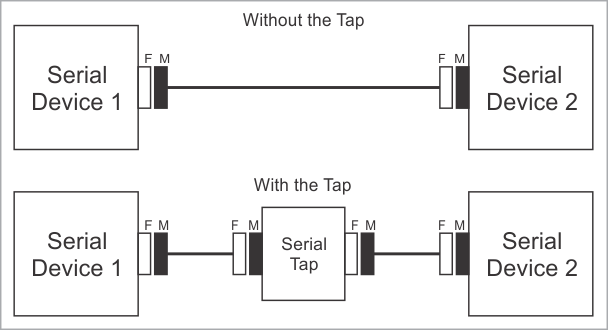
The Serial Tap allows you to insert (wedge) it in between two RS232 devices. Here is how this is done.
Let’s suppose that two serial devices are interconnected by a serial cable. Let’s also suppose that the first device has a DB9-F connector, while the second device has a DB9-M connector. The serial cable is, therefore, of the M-to-F type.
To wedge the Serial Tap between these two devices, you will need the second M-to-F cable:
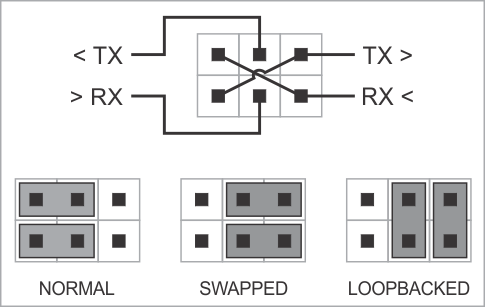
The Serial Tap has an additional useful feature allowing you to swap and loopback the signals in TX/RX, RTS/CTS, and DTR/DSR signal pairs. To achieve this, two jumpers are provided for each of the three pairs. There are three standard jumper configurations:
- Normal — In this position, the lines are arranged in such a way that wedging the Tap between the serial devices does not change anything. Meaning,
TXon one end goes toRXon another end, and vice versa. - Swapped — This swaps signals in a pair. Meaning,
TXgoes toTX, andRXgoes toRX. - Loopbacked — Both serial devices „receive back“ their own signals. Meaning, the
TXline on each side „comes back“ through theRXline.
The following diagram illustrates the jumper arrangements. The diagram shows the jumpers for the TX and RX signal pair. RTS/CTS and DTR/DSR jumpers work in the same way:
Key Features
- USB-powered, no additional external power necessary;
- Supplied with a
USB-Ccable and twoDB9gender changers; - Three operating modes:
RS232,RS485, andTTL-level UART; - Quick-release terminal block facilitates convenient wiring;
- Monitoring of
TX,RX,RTS,CTS,DTR, andDSRlines; - Onboard LEDs for line status indication;
- „Wedge“ monitoring of
RS232communications:DB9connectors for placing the Tap „between“RS232devices;- Jumpers for swapping and loopbacking RS232 signals within
TX/RX,RTS/CTS, andDTR/DSRsignal pairs; - Bi-color LEDs for distinguishing between positive, negative, and zero voltage levels on
RS232lines.
Hardware Specifications
| Parameter | Value |
|---|---|
| USB: | USB 2.0 interface, full-speed (12MHz), USB-C connector |
| Maximum baud rate: | Up to 1Mb/sec |
| Supported TTL logic levels: | From 3.3V to 5V |
| Operating temperature: | 0 to +60 degrees C |
| Operating relative humidity: | 10% to 90% |
| Mechanical dimensions: | 82 x 74 x 30 mm |
Documentation
| Resource | Description |
|---|---|
| Hardware Manual (HTML) |
This is the Serial Tap chapter in the IO Ninja hardware manual. |
| Hardware Manual (PDF) |
This is a PDF rendition of the above online HTML manual for downloading and printing. |
Zusätzliche Informationen
| Manufacturer |
|---|
Reviews
There are no reviews yet.